FORMAT Function in MS SQL Server and Its Equivalent in MySQL


In MS SQL Server, FORMAT is used to format both numeric values and date/time values to strings. In MySQL, you use FORMAT for numeric values and DATE_FORMAT for date and time values.

MSSQL

The FORMAT function was introduced in MS SQL Server 2012 only.

Syntax:

FORMAT ( value, format [, culture ] )
Formatting Numeric Values
SELECT FORMAT(123456789,'###-##-####') AS 'Custom Number Result';
----------------
123-45-6789

SELECT FORMAT(1.2365, 'N', 'en-us') AS 'Number Format'
,FORMAT(1.2365, 'G', 'en-us') AS 'General Format'
,FORMAT(1.2365, 'C', 'en-us') AS 'Currency Format'

Number Format General Format Currency Format
------------- -------------- ---------------
1.24          1.2365         $1.24
Formatting Dates
SELECT FORMAT ( '02/08/2002', 'D', 'en-US' ) AS 'US English Result'
----------------
Friday, February 8, 2002

SELECT FORMAT ( '02/08/2002', 'D', 'en-gb' ) AS 'Great Britain English Result'
----------------
08 February 2002

MySQL

In MySQL, use FORMAT to format numbers and DATE_FORMAT to format dates.

FORMAT Function

Syntax:

FORMAT(X, D [, locale])

Formats the number X to a format like '#,###,###.##', rounded to D decimal places, returned as a string. If D is 0, the result has no decimal point or fractional part.

mysql> select format(123.4567,3);
+--------------------+
| format(123.4567,3) |
+--------------------+
| 123.457            |
+--------------------+

mysql> select format(123.4567,1);
+--------------------+
| format(123.4567,1) |
+--------------------+
| 123.5              |
+--------------------+

mysql> select format(12345.6789,5);
+----------------------+
| format(12345.6789,5) |
+----------------------+
| 12,345.67890         |
+----------------------+

mysql> select format(12345.6789,0);
+----------------------+
| format(12345.6789,0) |
+----------------------+
| 12,346               |
+----------------------+
DATE_FORMAT

DATE_FORMAT has to be used in MySQL to format dates. It provides many formatting symbols to convert dates into any format you like.

Syntax:

DATE_FORMAT(date, format)

Common format symbols:

SymbolDescription
%aAbbreviated weekday name (Sun..Sat)
%bAbbreviated month name (Jan..Dec)
%cMonth, numeric (0..12)
%DDay of month with English suffix (0th, 1st, 2nd, 3rd, ...)
%dDay of month, numeric (00..31)
%eDay of month, numeric (0..31)
%fMicroseconds (000000..999999)
%HHour (00..23)
%hHour (01..12)
%iMinutes, numeric (00..59)
%jDay of year (001..366)
%kHour (0..23)
%lHour (1..12)
%MMonth name (January..December)
%mMonth, numeric (00..12)
%pAM or PM
%rTime, 12-hour (hh:mm:ss followed by AM or PM)
%S / %sSeconds (00..59)
%TTime, 24-hour (hh:mm:ss)
%WWeekday name (Sunday..Saturday)
%wDay of week (0=Sunday..6=Saturday)
%YYear, numeric, four digits
%yYear, numeric (two digits)
%%A literal % character
Examples
mysql> SELECT DATE_FORMAT(CURRENT_DATE,'%W %D %M %Y ');
+------------------------------------------+
| DATE_FORMAT(CURRENT_DATE,'%W %D %M %Y ') |
+------------------------------------------+
| Tuesday 19th July 2016                   |
+------------------------------------------+

mysql> SELECT DATE_FORMAT(CURRENT_DATE,'%d-%m-%y');
+--------------------------------------+
| DATE_FORMAT(CURRENT_DATE,'%d-%m-%y') |
+--------------------------------------+
| 19-07-16                             |
+--------------------------------------+

mysql> SELECT DATE_FORMAT(CURRENT_DATE,'%d-%b-%y');
+--------------------------------------+
| DATE_FORMAT(CURRENT_DATE,'%d-%b-%y') |
+--------------------------------------+
| 19-Jul-16                            |
+--------------------------------------+
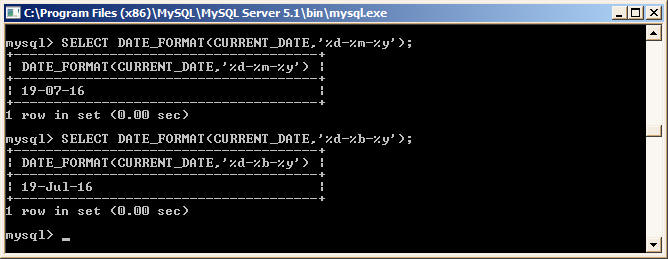
DATE_FORMAT function in MySQL

Back to Converting Functions from MSSQL to MySQL